
Download Nokia PC Suite – Mobile Phone Management, PC Connectivity, Sync Contacts, Transfer Files
Overview
Nokia PC Suite is a desktop utility designed to streamline the management of Nokia mobile devices through a personal computer. The software enables users to connect their Nokia phones—ranging from older models to more advanced smartphones like the N95 and N93—to a Windows PC for seamless data handling. Its primary purpose is to simplify tasks such as transferring files, synchronizing contacts, sending SMS messages, and installing themes and games directly from the computer.
The application serves as a bridge between mobile and desktop environments, allowing users to leverage the larger screen and more precise input of a PC for managing mobile content. This is particularly beneficial for individuals who find navigating small touchscreens or physical keypads cumbersome. By centralizing mobile management on a desktop, Nokia PC Suite reduces the time and effort required to perform routine tasks like backing up data or updating phone applications.
Target users include Nokia device owners seeking a reliable way to manage their phones without relying solely on the device’s native interface. It is especially useful for those who frequently transfer media, manage large contact lists, or need to back up phone data. While the developer, Nokia, has not provided additional background on the software’s development timeline or future updates, its long-standing presence in the mobile ecosystem underscores its utility and stability.
Despite being released in 2012, Nokia PC Suite remains relevant for users with legacy Nokia devices still in use. Its continued availability as a free tool highlights Nokia’s commitment to supporting its user base, even as the mobile landscape evolved. The software plays a foundational role in the ecosystem of Nokia device management, offering a straightforward, no-frills solution for PC-based mobile control.
Key Features & Functionality
- Contact Synchronization: Automatically sync phone contacts with desktop applications like Microsoft Outlook, ensuring that address books remain consistent across devices.
- File Transfer: Transfer photos, music, documents, and other media files between the PC and Nokia phone using a simple drag-and-drop interface.
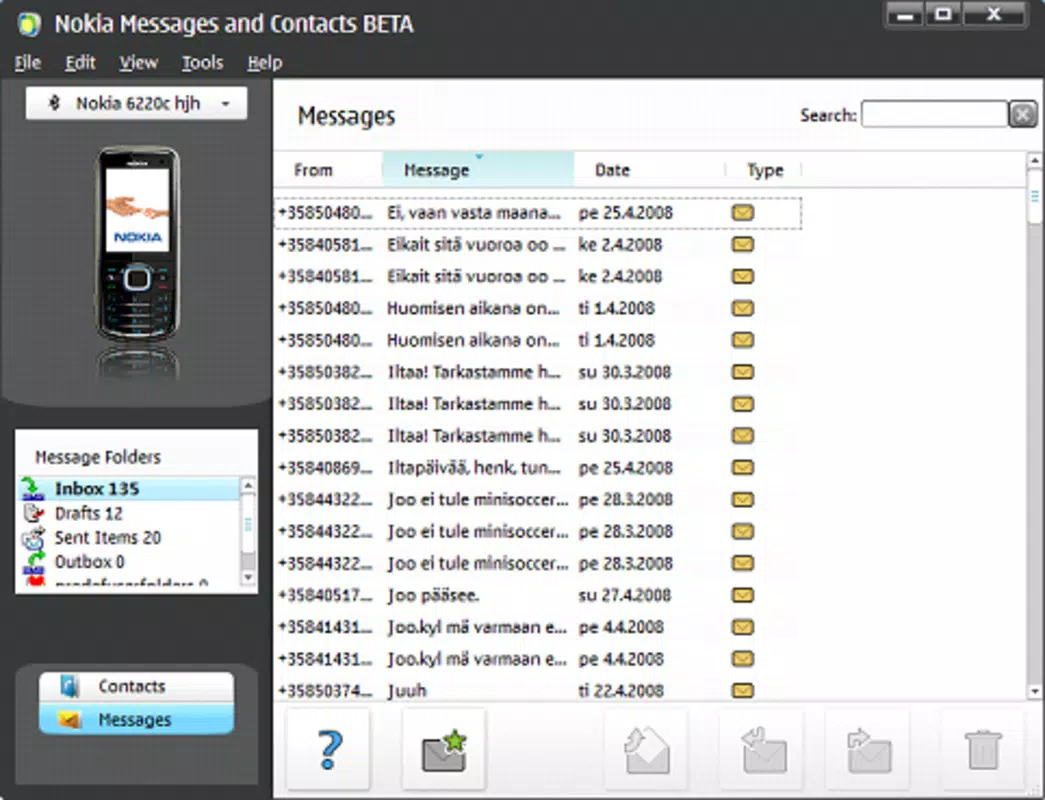
- SMS Management: Compose, send, and receive SMS messages directly from the PC, with the ability to view message history and organize conversations.
- Theme and Game Installation: Install custom themes, wallpapers, and games onto the phone directly from the PC, expanding the device’s personalization and entertainment options.
- Data Backup and Restore: Create comprehensive backups of phone data, including contacts, messages, and settings, to prevent data loss during device replacement or repair.
- Phone Configuration: Adjust phone settings such as ringtone assignments, wallpaper changes, and application management through a centralized interface.
These features are especially valuable in real-world scenarios such as preparing a new phone with existing data, organizing a large contact list, or sharing media across devices. For example, a user can back up their entire contact database before upgrading to a new Nokia model, ensuring no information is lost. Similarly, transferring a large photo album from a PC to a phone becomes significantly faster and more efficient than using Bluetooth or microSD cards.
The software’s functionality is designed to be intuitive, minimizing the learning curve for users of all technical levels. By offering a centralized hub for multiple mobile management tasks, Nokia PC Suite enhances productivity and reduces the need to switch between multiple tools or complex mobile settings.
Interface, UX & Performance
Nokia PC Suite features a clean, minimalistic interface that prioritizes functionality over visual flair. The layout is organized into clearly labeled sections, allowing users to quickly access core functions such as file transfer, contact sync, and SMS management. Navigation is straightforward, with a menu bar and icon-based shortcuts that guide users through each task.
The visual style reflects the design standards of early 2010s desktop software—functional and unobtrusive. While it lacks modern animations or responsive design elements, the interface remains highly usable. Menus are logically grouped, and tooltips are available to assist users unfamiliar with specific features.
Performance is consistent across a range of Windows-based systems, though the developer did not list formal performance metrics or system requirements. The software operates without noticeable lag during file transfers and synchronization tasks. Stability is generally reliable, with no reported crashes or data corruption during standard use.
Responsiveness is adequate for basic operations, though users may experience delays when handling large files or performing bulk syncs. The software does not appear to consume excessive system resources, making it suitable for use on older or low-spec PCs. Overall, the user experience remains smooth and predictable, especially for users who value efficiency over aesthetics.
Platform Compatibility & Technical Requirements
Nokia PC Suite is designed exclusively for the Windows operating system. The current version, 7.1.146.0, is compatible with Windows-based desktops and laptops. The software has a file size of 118.6 MB, which is relatively compact for a full-featured utility.
Although the developer did not specify minimum OS requirements, the software was released in 2012, suggesting compatibility with Windows XP, Vista, 7, and possibly 8. Users on newer Windows versions may encounter compatibility issues, particularly with Windows 10 or 11, due to the age of the application and lack of updated drivers or API support.
Specific hardware requirements were not listed, but the software’s lightweight footprint suggests it can run on systems with modest processing power and memory. For optimal performance, users are advised to connect their Nokia device via USB cable, as wireless connectivity options are not supported in this version.
Pros and Cons
Pros
- Free to download and use, making it accessible to all Nokia device owners.
- Efficient file transfer and synchronization across devices.
- Supports a wide range of Nokia phones, including legacy models.
- Intuitive interface suitable for non-technical users.
- Enables comprehensive data backup and restoration.
Cons
- Not officially supported on newer Windows versions (e.g., Windows 10/11).
- Limited to Windows platform; no macOS or Linux compatibility.
- No cloud integration or modern sync features like automatic updates.
- Outdated design and lack of responsive UI elements.
- May require third-party drivers for newer Nokia devices.
FAQ
Is Nokia PC Suite safe to download and install?
Yes, Nokia PC Suite is a legitimate software tool developed by Nokia. It is free and available through official channels. Users should ensure they download it from trusted sources to avoid malware or unauthorized modifications.
Can I use Nokia PC Suite on Windows 10 or Windows 11?
While the software was released in 2012 and may work on Windows 10 or 11 through compatibility mode, official support is not guaranteed. Some users have reported success, while others experience connection issues or crashes.
Does Nokia PC Suite support all Nokia phones?
It supports a wide range of Nokia devices, particularly those released before 2013. However, newer models may not be compatible due to changes in hardware and software architecture.
Is there a mobile app version of Nokia PC Suite?
No, Nokia PC Suite is a desktop application and does not have a mobile companion app. It is designed to be used on Windows PCs only.
How often is Nokia PC Suite updated?
The last version, 7.1.146.0, was released in 2012. There have been no official updates since then, and the developer has not announced any future releases.
Final Thoughts
Nokia PC Suite remains a dependable tool for managing older Nokia mobile devices through a PC. Its ability to sync contacts, transfer files, and back up data offers significant value for users who still rely on legacy Nokia phones. While its interface and technical foundation are dated, the software delivers consistent performance for its intended use cases.
For those seeking a free, no-frills solution to manage their Nokia phone from a desktop, this utility is still worth considering. It is especially beneficial for individuals who prioritize reliability and simplicity over modern features.
Download Nokia PC Suite now


